Set up SPF, DKIM, and DMARC for cold email: what each record does, how alignment breaks, and the DMARC policy progression bulk senders need.
11 min read
Table of contents
- Where to Next
- What Each Record Actually Does
- SPF: who is allowed to send for you
- DKIM: proof the message wasn't altered in transit
- DMARC: the policy that connects them to your From line
- Passing Is Not the Same As Aligning
- The DMARC Policy Progression: p=none, Then Quarantine, Then Reject
- Setup: The Order That Works
- We Check These Records Before Warmup Not After Bounces
- Related reading
- Frequently Asked Questions
- Do cold emails need all three records, or just SPF?
- How long until DNS changes affect placement?
- What happens if I skip DMARC entirely?
- Should cold email come from my main company domain?
- Does it matter whether SPF ends in ~all or -all?
- How do I read DMARC aggregate reports?
- What does "too many DNS lookups" mean in SPF?
- What does DMARC alignment actually check?
- Where to Start
Your cold email lands fine at 200 sends a day, then volume scales and opens collapse with no error message anywhere. That's usually authentication. Google's bulk-sender rules require SPF, DKIM, and DMARC, and enforcement is filtering, not a warning (Google sender guidelines). The threshold is 5,000 messages to Gmail addresses in 24 hours, which a scaling cold email team crosses faster than expected. Missing or misaligned records cost you placement at exactly the moment volume starts to matter. You can model this for your team with Reachfold's free Outbound Cost Calculator — set a meeting target and see the cost per meeting across all three routes.
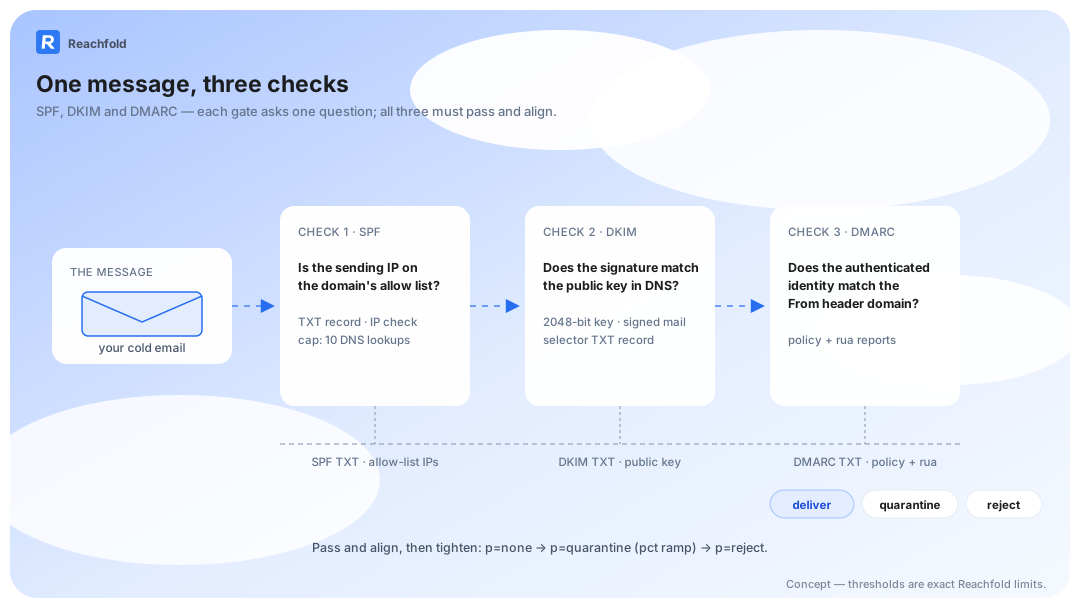
SPF, DKIM, and DMARC are three DNS records that together prove your message comes from your domain and hasn't been forged. SPF lists the servers allowed to send for you. DKIM signs each message. DMARC ties both to the From line recipients see and tells providers what to do when checks fail.
All three. Aligned. Before your first campaign.
Key Takeaways
- Google and Yahoo require SPF, DKIM, and DMARC from bulk senders and enforce the rules with filtering.
- A record can pass and still fail DMARC. Alignment with your visible From domain is the real test.
- Start DMARC at p=none, read the aggregate reports, then tighten to quarantine and reject.
- Verify all three records, aligned to your From domain, before warmup or your first campaign starts.
Where to Next
- Publishing records this week → the Google and Yahoo sender requirements checklist
- Hitting the 10-lookup ceiling → the SPF flattening explainer
- Planning the full sending stack → the six-layer infrastructure guide
What Each Record Actually Does
Each record answers one question a mailbox provider asks about your email. One paragraph each, one job each.
SPF: who is allowed to send for you
SPF is a TXT record listing the servers and providers authorized to send email for your domain (RFC 7208). The receiving server matches the sending IP against your list. One limit bites growing teams: SPF allows at most 10 DNS lookups per check, and every ESP you add through an include mechanism consumes one. Past 10, the record returns permerror and protects nothing. Keep the include list pruned, or SPF quietly stops working.
The mechanics matter once you stack providers. Include mechanisms and the redirect modifier expand recursively: each one triggers a fresh SPF evaluation, and every query inside those nested records counts toward the same limit of 10 (RFC 7208, section 4.6.4). An ESP that includes a vendor that includes a backup provider can exhaust the budget before your own sending IP is covered.
DKIM: proof the message wasn't altered in transit
DKIM attaches a cryptographic signature to every message (RFC 6376). Receivers pull your public key from DNS and verify the content survived the trip untouched. Google recommends 2048-bit keys or longer for bulk senders. Your ESP generates the key pair; your job is publishing the selector record and confirming signing is actually switched on. A DKIM key sitting in DNS proves nothing. Signed mail does.
DMARC: the policy that connects them to your From line
DMARC defines what counts as a pass against your visible From domain, what receivers should do with failures, and where to send reports (RFC 7489). It's the only one of the three that reports back to you: aggregate XML reports arrive daily and list every source sending as your domain. Read them. They're how you catch the vendor you forgot about.
| Record | What it does | Common failure |
|---|---|---|
| SPF (TXT) | Lists the IPs and providers allowed to send for your domain | More than 10 DNS lookups, or a missing include for your ESP |
| DKIM (TXT) | Signs each message so receivers can verify it wasn't altered | Signing never enabled at the ESP, or the selector record missing |
| DMARC (TXT) | Defines pass conditions against the From domain and asks for reports | Left at p=none forever, or reports unmonitored so failures go unnoticed |
Passing Is Not the Same As Aligning
Misalignment fails more cold email programs than any missing record. DMARC alignment passes only when at least one of SPF or DKIM matches the From domain your recipients see. A message can clear SPF, clear DKIM, and still fail, because alignment asks a different question: does the authenticated identity match the sender people actually see?
Definition, once: in relaxed alignment, the DMARC default, the RFC 5322 From domain passes when it matches either the SPF MAIL FROM domain or the DKIM d= domain, compared at the organizational-domain level. That's why a subdomain From line can align while an ESP bounce domain doesn't.
Failing setup: you send through an ESP using its own bounce domain, bounce.esp.com. SPF evaluates bounce.esp.com and passes. Your From line says acme.com. Nothing aligns. If DKIM isn't signed under d=acme.com either, DMARC fails, and Gmail treats a technically valid message as spoofing.
Aligned setup: a custom return-path at bounce.acme.com plus DKIM signing under d=acme.com. Both identities match the From line. DMARC passes with margin.
Valid papers from the wrong country still get you turned away at the border. Check alignment, not just existence.
This exact failure is what connection-time screening is for. Reachfold verifies SPF, DKIM, and DMARC as domain prerequisites and tests alignment against the From domain you'll actually send from, so a record set that passes individually but fails alignment stops the setup wizard, not the campaign. That's the gate we run on every campaign, and it exists because this misconfiguration hides behind three green checkmarks in a DNS panel.
The DMARC Policy Progression: p=none, Then Quarantine, Then Reject
The DMARC policy tag sets what happens to failing mail, and the safe path runs in three steps:
- p=none: monitor only. Failing mail delivers, but reports flow to you. Google requires at least p=none from bulk senders, and it's the right starting point everywhere.
- p=quarantine: failing mail goes to spam. Ramp it with the pct tag (p=quarantine; pct=25) so one mistake doesn't bury everything at once.
- p=reject: failing mail is blocked outright. Wait until reports show only sources you own.
Tighten only when the reports get boring: every line item is infrastructure you recognize. Not before.
Setup: The Order That Works
- Pick a sending subdomain, like mail.acme.com, so cold outreach never touches the reputation of your corporate root domain.
- Publish SPF on the subdomain with an include for every provider that sends as you, staying under the 10-lookup limit, ending in -all or ~all.
- Generate a 2048-bit DKIM key in your ESP, publish the selector TXT record, and send a test message to confirm the signature appears.
- Publish DMARC at p=none with a rua address pointed at a report parser you'll actually read.
- Verify alignment: send to a test mailbox and confirm the return-path and DKIM d= domain match your From domain.
- Watch aggregate reports for one to two weeks, then authorize or remove every sending source on the list.
- Tighten the policy: p=quarantine with a pct ramp, then p=reject once reports stay clean.
- Re-test placement with measured inbox placement testing before campaigns, because a DNS change doesn't count until the filters say so.
Steps 1 through 8 are mechanical once written down, and mechanical work belongs in tooling, not memory. Reachfold runs the domain checks before warmup starts and refuses a broken record, so the checklist runs once per domain and stays enforced after that. We put our own sending domains through the same gate every week.
We Check These Records Before Warmup Not After Bounces
Gate your own launch on authentication, not on bounces: if any record is missing, misaligned, or over its limit, don't start warmup, because every send from a broken domain teaches filters to distrust it. Once the checks pass, ramp volume slowly; day-over-day increases capped around 10% keep the curve human (email warmup). Reachfold runs this exact checklist as a domain prerequisite before warmup starts, so a broken record stops your setup instead of your campaign.
The full gate list, and what each failing check costs you:
| Check | If it fails |
|---|---|
| SPF present and syntactically valid | Block |
| Exactly one SPF record on the domain | Block: two records return permerror and invalidate both |
| SPF within the 10-DNS-lookup limit (RFC 7208) | Block: the record can't be evaluated |
| DKIM key at 2,048 bits or longer | Block: below Google's recommendation for bulk senders |
| DMARC record present | Block |
| DMARC policy at least p=none | Warn: p=none is the entry point, but for cold outreach we recommend at least quarantine once reports confirm your sources |
| SPF or DKIM aligned with the From header domain | Block: valid records, failing DMARC |
| Domain age (WHOIS) | 30+ days recommended; hard block under 14 days |
| Landing page live on the sending domain over SSL | Warn: filters check where your links land |
| Sending domain isn't the primary company domain | Warn: campaign risk belongs on a dedicated subdomain |
Authentication is a prerequisite, not a phase-two project. That's the whole point. The full stack those records switch on, from domains and mailboxes to IPs and warmup rails, is the cold email infrastructure layer. For what comes after the DNS records, list quality, volume discipline, and placement proof, read cold email deliverability: the verification-first guide.
One record breaks quietly at scale: SPF flattening explains the 10-lookup ceiling and the fix.
Frequently Asked Questions
Do cold emails need all three records, or just SPF?
All three if you send meaningful volume. Google and Yahoo require SPF, DKIM, and DMARC from bulk senders and enforce the rules with filtering rather than warnings. SPF alone fails DMARC alignment at scale, because ESP bounce domains don't match your From line. Publish all three on a dedicated sending subdomain.
How long until DNS changes affect placement?
Records propagate in minutes to 48 hours depending on TTL and provider caching. Filters typically re-evaluate within a day or two, so expect a short lag between publishing and any placement movement. Re-run a placement test about 48 hours after changes; propagation checkers confirm DNS, not filter behavior.
What happens if I skip DMARC entirely?
At low volume, you may deliver fine for a while. At bulk volume to Gmail and Yahoo addresses, a missing DMARC record violates the sender requirements directly, and the penalty is filtering with no notification. The symptom shows up as collapsed open rates, not as a warning message in your inbox.
Should cold email come from my main company domain?
No. Send from a dedicated subdomain so campaign reputation stays isolated from corporate mail. If outreach placement slips, invoices and proposals keep flowing. Publish the same three records on the subdomain, keep alignment internal to it, and complete warmup before real campaigns start.
Does it matter whether SPF ends in ~all or -all?
Less than you'd think. DMARC evaluates alignment between authenticated identities and your From domain, not the SPF qualifier alone. Use a hard fail or soft fail consistently, and make sure every legitimate source passes. The real killer is an incomplete include list, because -all then blocks mail you meant to deliver.
How do I read DMARC aggregate reports?
Reports arrive as XML at the rua address you publish, usually daily, listing every source that sent as your domain, its SPF and DKIM results, and the alignment outcome per provider. Raw XML is unreadable, so route it to a parser or your ESP's DMARC tooling. Investigate unrecognized sources first.
What does "too many DNS lookups" mean in SPF?
SPF evaluation is capped at 10 DNS queries, counted across include mechanisms and the redirect modifier, and nested records stack toward the same cap. Cross it and the record returns permerror, which receivers treat as no valid SPF. Prune stale ESP includes and keep the record limited to sources that actually send as you.
What does DMARC alignment actually check?
Alignment compares the visible From header domain (RFC 5322) with the message's authenticated identities: the SPF MAIL FROM domain or the DKIM d= domain. In relaxed mode, the DMARC default, matching organizational domains is enough, so mail.acme.com aligns with acme.com. If neither identity matches, DMARC fails even though SPF and DKIM pass individually.
Where to Start
Three TXT records decide whether cold email is a channel or a gamble. Publish them, prove alignment, tighten the policy on evidence, and re-test before launch. Then run the full Google and Yahoo sender requirements checklist, work through the broader causes in why emails go to spam, and see how the enforced version works on our pricing.