A day-by-day email and LinkedIn sequence template: when each step fires, the fit gate that guards LinkedIn steps, and how replies from both channels land in one inbox.
8 min read
Table of contents
- Where to Next
- Why the Mix Works: Two Channels, Two Failure Modes
- The Day-by-Day Skeleton
- When a LinkedIn Step Actually Fires
- Building Your First Two-Channel Campaign
- How Replies Route in a Two-Channel Sequence
- Frequently Asked Questions
- Should email and LinkedIn run as one sequence or two parallel campaigns?
- How many LinkedIn steps should a two-channel sequence have?
- What happens if a lead replies while a LinkedIn step is pending?
- Do I need a separate LinkedIn tool to run this?
- What does a lead need to qualify for LinkedIn steps?
- The Next Step
- Related reading
Your best lead replies on LinkedIn, and nobody answers for three days because the reply landed in a tool nobody was watching. That's the two-channel tax: email and LinkedIn run on separate timelines, in separate inboxes, and every handoff between them is a place where a hot reply goes cold. Worse, teams double-send — a connect request and a cold email hitting the same person in the same week, each unaware of the other. One sequence with one reply inbox ends the tax. Before sending, run your copy through Reachfold's free Spam Score Checker — it flags trigger phrases with plain-English fixes.
The mix itself is right. Email and LinkedIn fail differently, and that's exactly why they cover each other: email risks placement — a verified message can sit in spam where no human sees it — while a LinkedIn connect note lands on a screen your prospect checks all day. A two-channel outreach sequence is one campaign with one timeline: email and LinkedIn steps alternate in a single sequence, and a reply on either channel stops the machine and starts a conversation. The build-level mechanics live in our email and LinkedIn sequences guide.
Key Takeaways
- Two-channel sequencing is one sequence with one reply inbox, not two campaigns running side by side.
- The channels cover each other's failure modes: email carries placement risk, LinkedIn wins attention.
- Gate LinkedIn steps: fire them only when a lead has a strong ICP fit and a LinkedIn URL.
- The starter skeleton: Day 1 email, Day 3 connect request, Day 6 email follow-up, Day 9 LinkedIn message, Day 12 breakup email.
- Answer on the arrival channel, and keep replies short — email replies short, LinkedIn replies shorter.
Where to Next
- A team building the campaign step by step → the email and LinkedIn sequences guide
- A team deciding which leads earn the LinkedIn leg → when to switch from email to LinkedIn
- A team keeping LinkedIn accounts safe → LinkedIn message limits and safety
Why the Mix Works: Two Channels, Two Failure Modes
Email's failure mode is delivery. A message can be verified, authenticated, and compliant, and still never get seen, which is why launch should be gated on measured placement rather than hope. Google's sender guidelines set the bar plainly: authenticated mail that recipients actually want (Email sender guidelines, Google Workspace). Measure whether you clear it with placement tests (measured inbox rate).
LinkedIn's failure mode is attention. Nearly every connect note reaches a human decision: accept or ignore. That changes the risk profile. When email misses, you lose the send. When LinkedIn misses, you lose a moment, not the thread.
The two cover each other. An unanswered email gives the connect note context, and an accepted request gives the next email a familiar name. One lead, two surfaces, one story.
Email hedges against silence. LinkedIn breaks it.
The Day-by-Day Skeleton
This is a starting template, not a benchmark claim. Adjust the wait days to your sales cycle. Keep the channel logic.
| Day | Channel | Step | Goal |
|---|---|---|---|
| 1 | Intro email: one pain, one proof point, one soft ask | Open the conversation | |
| 3 | Connect request with a note (within LinkedIn's own note limit, no links) | Build a second surface | |
| 6 | Follow-up in the same thread with a new angle | Convert on email | |
| 9 | Message to the new connection: short, specific, no links | Get attention email can't | |
| 12 | Breakup email: close the loop, make "no" a clean answer | Force a decision |
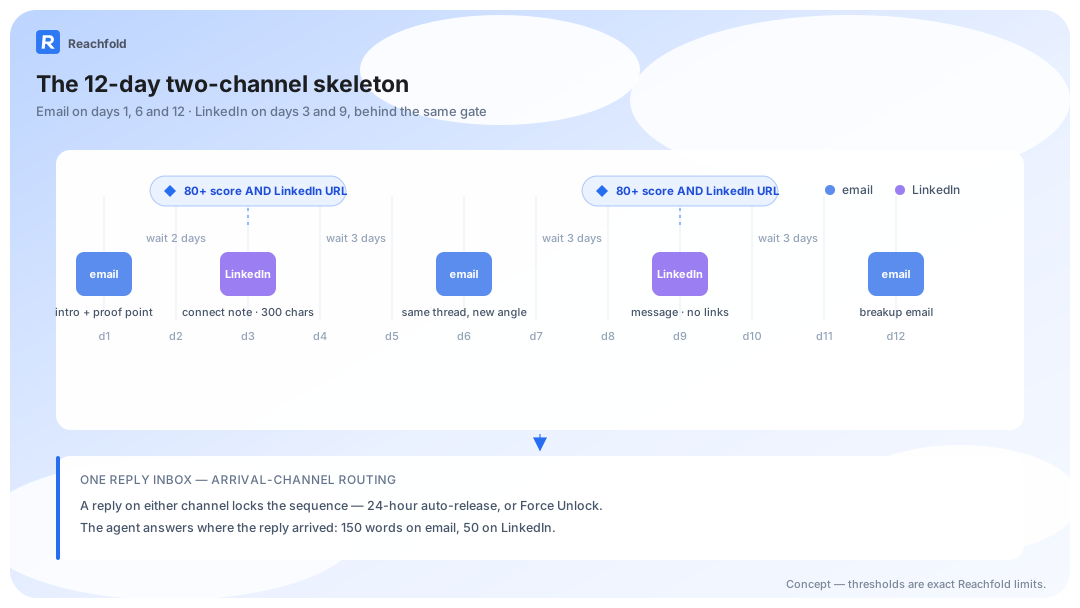
Day 12 exists because "just bumping this" is not an angle. A breakup email that makes "no" easy to say often earns the reply every earlier step wanted.
The skeleton works best with a builder that plans the sequence shape first (channels, angles, wait days), then generates the per-channel content. Strategy first, craft second. Mixing them is how campaigns end up with five clever emails and no plan.
We don't publish a response-rate lift for the mix yet. The measurement is already defined: placement-tested inbox placement for the email leg, classified reply logs for the LinkedIn leg, same lead cohort, same volume.
Copy the days. Edit the angles. Keep the gate.
When a LinkedIn Step Actually Fires
The template is not a promise. A LinkedIn step runs only when two conditions hold: the lead grades as a strong ICP fit, and the lead has a LinkedIn URL. The grade comes from data quality plus role, industry, and company-size match. No URL, no step. Low fit, no step.
That gate changes what the template means. For a high-fit lead, LinkedIn steps sit inside the sequence from day 3. For everyone else, the same campaign quietly runs email-only, which is the correct amount of channel for an unproven lead.
Everything on the LinkedIn leg obeys the channel's rules: notes and messages within LinkedIn's own length limits, zero links, and no obvious sales vocabulary. The full rulebook lives in the limits and safety guide (LinkedIn message limits and safety). Reachfold enforces the fit gate at send time, so the branch happens by rule rather than by memory. That's the gate we run on every campaign.
One gate decides the branch: proven fit.
Building Your First Two-Channel Campaign
- Grade the list before you build anything. Every lead is ranked by ICP fit; sort by it and let the bottom of the list wait.
- Plan the skeleton in the builder: one pass defines channels, angles, and wait days. The full walkthrough lives in the sequences feature (email and LinkedIn sequences).
- Generate content per channel in the second pass, so email copy and LinkedIn notes are each built to their own channel's rules.
- Clear the pre-send placement test: measured inbox placement, so a risky campaign doesn't launch. A two-channel campaign with a spam-folder first touch is just a slow LinkedIn campaign.
- Connect one protected LinkedIn account: a secured connection with two-factor authentication and a dedicated IP.
- Launch in suggest mode: the agent drafts, you approve everything, and autonomy gets earned later.
The hand-built version of this choreography breaks in week two: someone approves a LinkedIn step for a lead who never cleared the fit bar, a connect request strands past its deadline, a reply lands while an email step is already queuing. Reachfold runs the fit gate, the sequence lock, and the per-channel checks mechanically, so the template survives contact with a real week. That's the gate we run on every campaign.
How Replies Route in a Two-Channel Sequence
Replies from both channels land in one unified inbox. The moment a reply arrives, the lead's sequence locks, so no scheduled step fires into an active conversation. The lock releases on its own if the thread goes quiet, or you force it early once you've answered.
The agent answers on the arrival channel: email replies stay short, LinkedIn replies shorter. Meeting requests always route to a human; the agent never books, it serves your booking link. The routing logic and approval flow get their own guide (multi-channel reply management). That's the gate we run on every campaign.
One thread per lead. Wherever they answer, that's where the conversation continues.
Frequently Asked Questions
Should email and LinkedIn run as one sequence or two parallel campaigns?
One sequence. Parallel campaigns double-send the same lead and produce the classic failure: a prospect answers on LinkedIn while an email step fires the next morning anyway. A single sequence with one reply inbox keeps the timeline and the conversation in one place, and the reply lock stops steps from talking over an active thread.
How many LinkedIn steps should a two-channel sequence have?
Our starter template uses two: a connect request on day 3 and a message on day 9. There's no universal standard for more, and LinkedIn volume is constrained by account safety, not ambition. Treat additional steps as something reply data earns, not something a template grants by default.
What happens if a lead replies while a LinkedIn step is pending?
The sequence locks on any reply, either channel. Scheduled steps pause so nothing fires into a live conversation, the lock releases on its own once the thread goes quiet, and you can force it earlier once you've responded. A pending LinkedIn step only resumes if the thread stays silent.
Do I need a separate LinkedIn tool to run this?
Not necessarily. Whatever runs the LinkedIn leg needs a secured account connection with two-factor authentication, a dedicated IP per account, and channel limits enforced before content sends; Reachfold does this natively. What a second tool always adds is a second inbox, which reintroduces the exact double-answer problem the unified routing exists to remove.
What does a lead need to qualify for LinkedIn steps?
A strong ICP-fit grade, plus a LinkedIn URL on the record. Below that bar, the campaign runs email-only; the lead isn't punished, the second channel just doesn't spend attention on unproven fit. The floor is the system's, and it doesn't move.
The Next Step
Run the template once, exactly as tabled, before you customize it. The reply data will argue for changes more honestly than best practices will. When you want the switch logic in detail (which leads earn the LinkedIn leg, and when), read the channel-switch guide (when to switch from email to LinkedIn). For plans and pricing, see Reachfold pricing.