How a safe AI SDR works: every reply stops the sequence, drafts wait for your approval, and the agent learns from your edits — nothing sends without you.
12 min read
Table of contents
- Where to Next
- Approval Is a Rule, Not a Mode
- The Rules That Gate Every Send
- The Workflow, End to End
- What the Risk Check Catches Before You See It
- Auto, Approval, or Never
- The Guardrail Spec, Line by Line
- Your First Week with an Approved Agent
- Which Plans Run Which Level
- Verdict: You Own Consequence, the Model Owns Volume
- Related reading
- Frequently Asked Questions
- What does an AI SDR with human approval actually do without me?
- How fast does the approval queue fill up?
- Can I edit a draft before approving it?
- What happens if the agent misreads a reply?
- Does approval slow down reply speed?
- Is this the same as an autopilot mode with an undo button?
- Which plans include the agent, and at what level?
Turn an AI SDR loose with no approval gate and the failure arrives by email: a wrong answer to a real question, a meeting accepted by a model, a pricing promise nobody priced. The fix is a rule, not a mode: every action the agent proposes passes a gate that can stop the send, and anything risky or uncertain is forced into your review queue. That gate is the whole difference between an AI SDR with human approval and an autopilot with a logging page (the failure modes in where AI sales agents fail are what it stops). Here's the workflow end to end, including what runs without you. To see what your own meeting target costs each way, Reachfold's free Outbound Cost Calculator compares an in-house SDR, a lead agency and Reachfold side by side.
Definition: An AI SDR with human approval automates classification, drafting, and low-risk sends, and routes consequential actions (meeting requests, unusual asks, anything low-confidence) to a person who approves before execution. Approval is a rule applied per action, not a mode you switch off when you get busy.
Key Takeaways
- The moment a reply arrives, the whole sequence stops — and by the time you open your queue, the answer is already drafted, meeting requests on top.
- You clear the obvious batch in one click and fix the rest inline, without leaving the queue.
- Anything risky or uncertain is forced into manual review. Meeting requests are never auto-answered.
- The agent learns your voice from your edits: once a week it proposes style rules, and nothing changes until you approve them.
Where to Next
- New to the model? What Is a Human-in-the-Loop AI Agent? is the primer.
- Ready to hand safe replies to the agent? The autonomy ladder is in What an AI Reply Agent Should (and Shouldn't) Do Alone.
- Comparing vendors on guardrails? Take the six questions from Best AI SDR Tools (2026): Criteria, Not Rankings to every demo.
Approval Is a Rule, Not a Mode
The rule we sell is simple: easy, low-risk tasks run automatically; risky requests go to a human. That's why approval isn't one big toggle labeled "autopilot." It's a decision applied to every single action.
Your first campaign runs in suggest mode: the agent drafts, you approve everything. Once you move to semi-auto mode, the agent auto-acts only on safe replies. Interested replies auto-send only when the AI is certain it read them right. Questions get an even stricter bar. Everything else waits.
The rules do the politics for you. When someone asks why the agent doesn't just send everything, the answer is a policy, not an opinion. One rule, enforced per action, scales. Trust doesn't.
The Rules That Gate Every Send
Four rules decide what happens to each action. They're policy, not suggestions:
| Condition | Outcome |
|---|---|
| Interested reply the AI is certain about (semi-auto) | Auto-sends |
| Question the AI can answer with facts (semi-auto) | Auto-sends |
| Risky or uncertain action | Forced into manual review |
| Shaky draft | Defaults to dismiss, never to send |
Outside the auto rules, everything lands in your queue. Uncertainty is treated as a signal, not an obstacle: a dismiss-by-default draft costs you a glance, while a wrong send costs a thread.
The Workflow, End to End
- A reply arrives. The lead's sequence locks instantly, so no scheduled step fires into an active thread. It releases automatically once the thread settles, and you can open it sooner yourself.
- Classification runs. The classifier auto-labels the reply — interested, question, meeting request, neutral, not interested, out of office, unsubscribe, deletion request, bounce — plus a sentiment reading (positive, neutral, negative, redirect).
- A proactive draft appears. Within seconds, the reply is drafted and the Need-Approval inbox shows a "Draft ready" item. Nobody had to ask for it.
- The risk check runs. Anything risky or uncertain is forced into manual review; shaky drafts default to dismiss.
- You decide on the approval surface. Clear the ones that read fine in one click, edit the one that doesn't, or ask for a different angle — each decision takes seconds, not a rewrite.
- Send or escalate. Approved drafts go out. Escalated ones land in your queue with the classification attached, so you can see in one glance what the model thought it was reading.
The loop is: lock, classify, draft, score, approve, send. One human step, in the right place. The classification mechanics are documented separately in how we classify, route, and respond to replies.
The pain this loop removes is the 9 a.m. triage dump. Without it, every reply from the overnight window sits in one inbox, and the hot ones hide behind forty out-of-offices. With it, you open the Need-Approval queue to find meeting requests on top, drafts attached, and the safe classes already handled. We run this on our own outbound every week; the queue is the first thing we check, and it's short.
What the Risk Check Catches Before You See It
Tripwires fire on three kinds of danger.
The request type itself. Meeting requests are always human-approved; the agent's job is to recognize one and stage your booking link (the meeting handoff, step by step), not to accept it. Data deletion requests never enter the send queue. Unsubscribe requests leave the agent's world entirely: suppression plus RFC 8058 one-click unsubscribe headers handle them without a human and without a send. The legal reasoning behind those never-send classes (CAN-SPAM identification, GDPR deletion rights) is detailed in AI SDR compliance with CAN-SPAM and GDPR.
The uncertainty. When the AI isn't sure it understood a reply, the action is forced into review. This is where overconfident autopilots die: an oblique question read wrong goes to a prospect who'll mark it spam, not to you.
The risk level. The risk check grades each action before it runs, and a risky grade overrides even high certainty, because certainty and safety aren't the same variable. Most of the check's work is quiet. That's what clean looks like. The full risk-grading logic is broken down in agent risk scoring.
Auto, Approval, or Never
| Tier | What's in it | How it's handled |
|---|---|---|
| Auto (semi-auto, gated) | OOF rescheduling with parsed dates; not-interested closing to Lost; interested replies the AI is certain about; questions it can answer with facts | Sends immediately; the early semi-auto actions carry undo buttons |
| Approval ("Draft ready") | Interested or question replies the AI isn't certain about; neutral replies; re-engagement drafts after an OOF pause; everything in suggest mode | Approve All, inline edit, or Regenerate in the Need-Approval inbox |
| Never | Meeting bookings; data deletion requests; unparseable OOF dates | Human decides: a booking link goes out instead of a booking; an unparseable date pauses and goes to triage |
If you can't say which tier an action lands in, it's approval-tier by default.
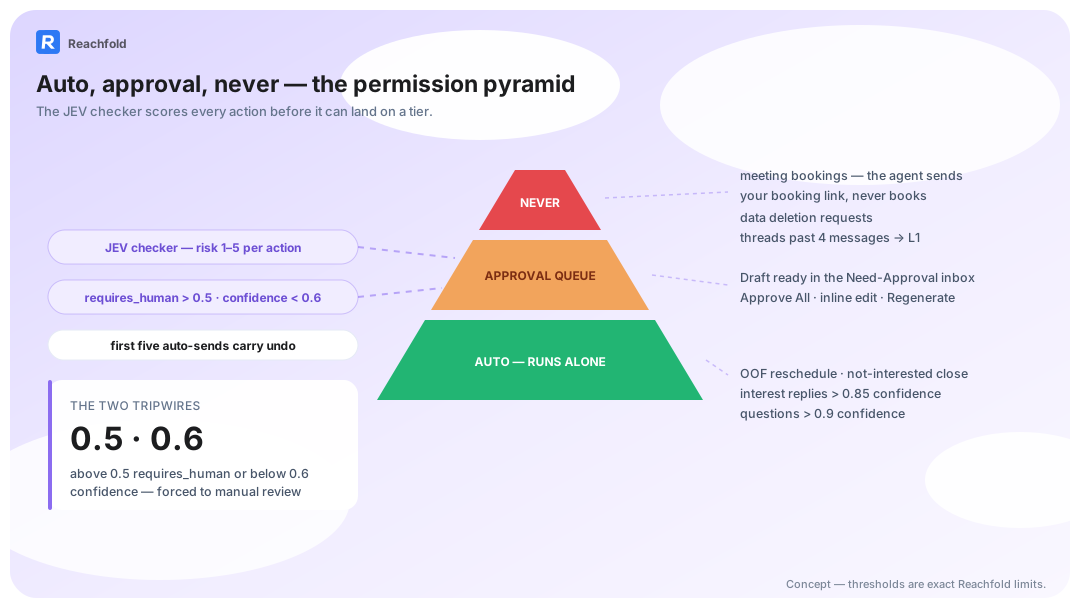
The Guardrail Spec, Line by Line
Some of these rules appear elsewhere on this page. They belong in one list, because a guardrail you can't quote from memory isn't a guardrail.
- Never auto-books. Meeting requests are always human-approved; the agent stages your booking link, and a human closes.
- Undo grace. Early auto-sent actions after moving to semi-auto mode carry undo buttons.
- Knowledge Base gate. The agent stays disabled until your Product Knowledge Base is filled in: product description, pricing and integrations, and common objections.
- Long threads stay reviewable. The agent reads the full conversation at any length and keeps the autonomy level you chose; an episodic context summary condenses long threads so you can review them at a glance.
- Self-correction is opt-in. The weekly analysis of your edits produces style rules you approve before they're ever activated.
- Compliance classes never auto-reply. The classification routing has exceptions that leave the agent's hands: a deletion request stops outreach and routes to a human process (never auto-replied), and unsubscribe and bounce are not processed by the agent at all.
Replies also stay short and on-channel: short for email, shorter for LinkedIn, on the channel the reply came from. Brevity is a deliverability decision as much as a style one. Guardrails that loosen with success aren't guardrails. They're memories.
Your First Week with an Approved Agent
- Day 1: teach the product gate. The agent stays disabled until you load your Product Knowledge Base: product description, pricing and integrations, and common objections. Objection handling starts from your answers, not the model's imagination.
- Days 1-2: run suggest mode. Every draft comes to you. Approve the good ones; Regenerate the angle that misses. You're building the edit record.
- Day 3: audit the queue, not the sends. Classification quality shows up as misroutes: a question tagged neutral, a classification that disagrees with your gut. Fix the routing while volume is low.
- Days 4-5: let the weekly style-rule pass run. Once a week, your edits become style rules; you approve each before it's used, so the agent learns your voice without learning your bad days.
- Day 5: graduate safe classes to semi-auto. OOF rescheduling and not-interested closure first. The early auto-sent actions carry undo buttons, so the transition is reversible.
- Friday: keep the never list. Meetings still route to you. Long threads still come with the episodic summary that keeps them reviewable. That list doesn't shrink with trust; it is the trust.
A week of approvals buys you an agent whose auto-sends you have, in effect, already read.
Which Plans Run Which Level
Autonomy is plan-gated, so here's the ladder without the sales gloss:
| Plan tier | Sales Agent autonomy |
|---|---|
| Starter, Growth | Suggest mode: the agent drafts, you approve everything |
| Scale, Agency | Semi-auto mode: safe reply classes send themselves |
Start in suggest mode, graduate your safe reply classes, and semi-auto turns routine sends over to the risk check. Full auto isn't a shipping feature anywhere; treat any vendor's full-auto promise skeptically.
The fear every team brings to automation is the same: the moment you look away, the agent says something you'd never say. Graduation exists for exactly that fear, one reply class at a time, early auto-sends carrying undo buttons, the never list fixed. On Reachfold, autonomy is earned in increments you can reverse, and that's the gate we run on every campaign.
Verdict: You Own Consequence, the Model Owns Volume
An AI SDR with human approval isn't a slower autopilot. It's a different contract: the model handles volume and speed, you handle consequence. The workflow above is that contract in six steps, enforced by rules rather than by trust.
Comparing us against autopilot tools? Compare failure modes too. Theirs run through your domain reputation (why autopilot SDRs burn domains). Ours stop at a queue item you can edit or dismiss.
Next step: tour the human-in-the-loop AI agent, or check pricing to match the autonomy level to your plan.
Frequently Asked Questions
What does an AI SDR with human approval actually do without me?
It handles classification, drafting, and the safe send classes you've graduated: out-of-office rescheduling, closing not-interested leads, and, in semi-auto mode, interest replies the AI is certain about. Everything else lands in the Need-Approval inbox as a "Draft ready" item. Meeting requests always wait for you, at every autonomy level.
How fast does the approval queue fill up?
Fastest in week one, in suggest mode, when every draft routes to you. After you graduate safe classes to semi-auto mode, the queue shrinks to genuinely ambiguous threads: uncertain replies, unusual requests, anything the risk check flags. Approve All clears the routine batch. The queue is designed for judgment, not bulk clicking.
Can I edit a draft before approving it?
Yes, inline. The approval surface supports rich-text editing, so you can fix a sentence without leaving the queue, or hit Regenerate for a different draft at the same classification. Every edit feeds the agent's weekly learning pass, which proposes style rules from your changes. You approve those rules before they're applied, so the learning is yours.
What happens if the agent misreads a reply?
The sequence lock limits the damage: once a reply arrives, nothing else sends on that thread until you act or the lock releases on its own. Misreads surface in the queue with the classification attached, so you can see what the model thought it read. Systematic mistakes become style-rule fixes in the next weekly learning pass.
Does approval slow down reply speed?
On routine classes, no: those never route through you at all. On consequential sends, you are the latency, and that's deliberate. The trade is explicit: seconds of autonomy on cheap actions, minutes of review on expensive ones. A draft waiting hours for you is slower than autopilot and much cheaper than a wrong send.
Is this the same as an autopilot mode with an undo button?
No. Undo is a post-send backstop; approval is a pre-send gate. Our agent has both, in that order: the checker stops risky actions before they run, and the early auto-sent actions after moving to semi-auto mode carry undo buttons as a grace period. A product that only offers undo is asking you to QA its mistakes after prospects already have.
Which plans include the agent, and at what level?
When you compare vendors, read the plan gating as a signal: the approval-first mode should ship on every tier, with automation as the upgrade. Reachfold has no free plan. The lower tiers (Starter, Growth) include suggest mode: the agent drafts, you approve everything. The higher tiers (Scale, Agency) include semi-auto mode, where safe reply classes send themselves. Full auto isn't a shipping feature anywhere.