Gmail allows about 500 recipients a day, Workspace about 2,000, Outlook.com about 300. What's actually safe for cold outreach, and the ramp we use.
7 min read
Table of contents
- Where to Next
- The Official Limits (2026)
- Why the Official Limit Is Not a Safe Target
- The Gap Between Allowed and Safe
- A Safe Volume Ramp for a New Inbox
- Scaling Past One Inbox
- Frequently Asked Questions
- What is Gmail's daily sending limit?
- What happens if I exceed the limit?
- How many cold emails can I safely send per day from one inbox?
- Is Outlook.com a good channel for cold outreach?
- Do scheduled emails count against the daily limit?
- How do I scale past one inbox?
- The Short Version
- Related reading
Gmail lets a free account reach about 500 recipients a day and a Google Workspace account about 2,000. Those are ceilings, not targets. A week-old inbox that pushes either number with cold mail never gets to enjoy the cap, because spam filters bury it long before the provider does. Here are the official limits, the gap between them and safe practice, and the ramp that closes it. If the plumbing itself is the question (hosts, ports, OAuth versus app passwords), the SMTP settings guide covers the connection half. And if the choice is between the suites themselves, the Google Workspace vs Office 365 comparison maps what actually changes for cold email. Before sending, run your copy through Reachfold's free Spam Score Checker — it flags trigger phrases with plain-English fixes.
A sending limit is the number of recipients (not campaigns) one account may email in a day before the provider blocks or throttles it.
Key Takeaways
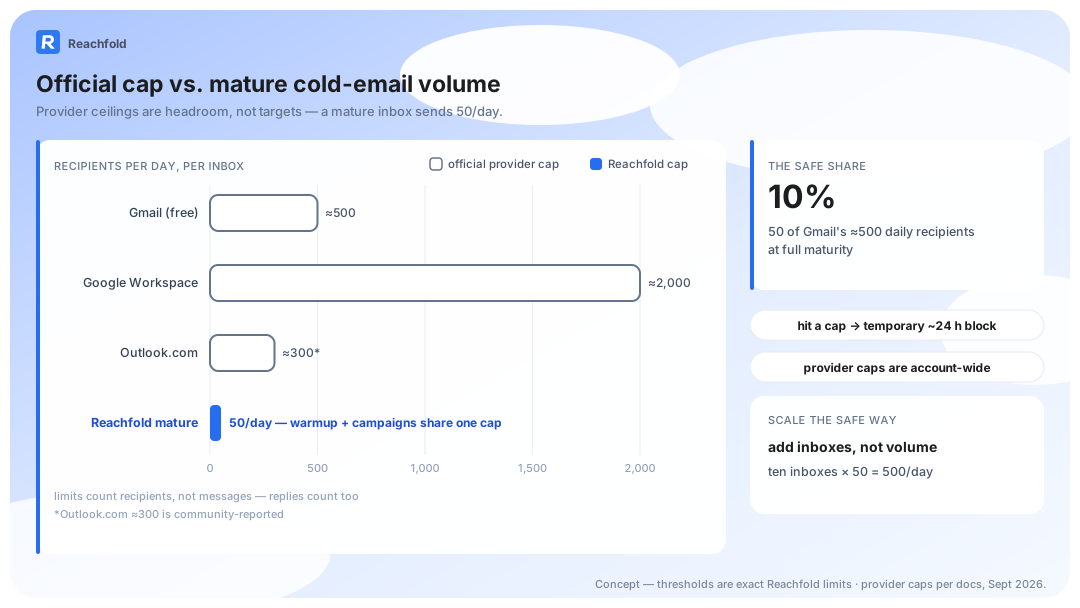
- Official caps: 500 recipients a day on free Gmail (Google) and 2,000 on Google Workspace (Google Workspace); Outlook.com's roughly 300 is community-reported.
- The caps are account-wide and cover replies and newsletters, not just campaigns.
- Safe cold-email volume sits far below the caps: a fraction of the limit per inbox at maturity, campaigns and warmup combined.
- Scale by rotating inboxes, not by pushing one account harder.
Where to Next
- Setting the mailboxes up first: the OAuth and app-password walkthrough.
- Ramping a new domain properly: how to warm up an email domain.
- Running client volume: cold email for agencies.
The Official Limits (2026)
| Provider | Official daily limit | Safe cold-email practice |
|---|---|---|
| Gmail (free) | ≈500 recipients/day | A small fraction of the cap per inbox, reached on a ramp |
| Google Workspace | ≈2,000 recipients/day | Same per-inbox volume; the cap buys headroom, not volume |
| Outlook.com | ≈300 recipients/day, community-reported (Microsoft) | Same rule; treat as the strictest of the three |
Three notes. The limits count recipients, not messages, so one email to 100 people consumes 100. They're account-wide, which means your replies, follow-ups, and any other tool sending through the mailbox draw from the same bucket. And exceeding one triggers a temporary block, usually 24 hours, not a negotiation.
Why the Official Limit Is Not a Safe Target
The caps exist to stop bulk abuse, not to bless it. Reputation, complaint rate, and engagement patterns decide placement long before volume approaches 500. A first-week inbox firing 400 cold emails is a textbook spam signature: no history, no engagement, maximum volume. It lands in spam without ever touching a limit.
Google's own sender guidance makes the priorities plain: authenticate your mail, keep complaints under 0.3%, and make unsubscribing easy (Google, Email sender guidelines; the full requirements checklist). Volume discipline sits underneath all three. When filtering does bite, the autopsy usually starts in why emails go to spam, not at the counter.
The limit tells you where the account breaks. It says nothing about where the mail lands.
The Gap Between Allowed and Safe
Keep a mature inbox at a small fraction of its provider cap — campaign and warmup traffic combined — with daily volume that varies a little so the pattern never looks machine-drawn. That's roughly a tenth of a free Gmail account's limit, sent inside the recipient's business hours. It sounds conservative until you price the alternative: a burned domain, a dead sequence, and a re-warmup you didn't schedule. The full volume math lives in how many cold emails per day.
Filters don't count your sends. They count engagement, complaints, and pattern breaks. A few dozen well-targeted emails to verified recipients produce all three signals in healthy ranges. Five hundred don't.
The pressure to break this rule always arrives the same way: launch week, one inbox, a list that took two months to build. Hold the cap anyway. Reachfold paces each account's daily limit and refuses the spike automatically, so the discipline doesn't depend on whoever is watching the queue. We build Reachfold, and that's the gate we run on every campaign.
Capacity you don't use is cheaper than reputation you have to rebuild.
A Safe Volume Ramp for a New Inbox
The ramp matters more than the ceiling (the full timeline covers every phase). Here's the sequence to enforce:
- Week one: setup and slow start. Domain prerequisites verified before any volume, then minimal, hand-paced sending.
- Week two: small daily sends. Varying daily limits; no two days identical.
- Weeks three and four: approach the working ceiling. Climb gradually, so providers never see a spike.
- Maturity. One combined ceiling shared by warmup and campaigns, with maintenance warmup continuing permanently.
The full mechanics, including what happens after a pause, are in our email warmup guide.
A spreadsheet can run this ramp; the failure mode is that spreadsheets don't stop anyone. Reachfold enforces the ramp per account, and no campaign launches until a placement test proves clean measured inbox placement — a risky campaign doesn't launch.
A month of patience buys years of sending.
Scaling Past One Inbox
Rotation is how volume grows past one inbox. Ten inboxes each sending a modest, controlled share of their provider cap is hundreds of controlled emails a day, spread across accounts and domains, each one staying invisible to every filter. We handle the scheduling side in inbox rotation and sending limits.
Two rules keep rotation honest. Every inbox warms independently before it carries campaign volume. And every domain carries its own authentication, so one mistake can't torch the fleet.
The math makes the decision for you: ten inboxes sending honest volume beat one inbox pushing its cap, because the first fleet compounds while the second accumulates a complaint history. We run that rotation on our own domains every week; the scheduling is rotation across inboxes, and the per-inbox discipline doesn't move.
Add inboxes to scale. Never add volume to one.
Frequently Asked Questions
What is Gmail's daily sending limit?
Roughly 500 recipients a day on free Gmail and about 2,000 on Google Workspace, both documented by Google; Outlook.com sits near 300, a community-reported figure with no official Microsoft number behind it. The limits are account-wide, they cover replies and newsletters too, and hitting one triggers a temporary send block, not a ban.
What happens if I exceed the limit?
Google temporarily blocks sending, typically for 24 hours, and returns errors on further attempts. Outlook.com throttles similarly. The bigger cost is invisible: accounts that brush their caps every week draw closer spam filtering even when they stay under the number. Treat the official limit as a ceiling you never approach.
How many cold emails can I safely send per day from one inbox?
A small fraction of the provider cap at maturity, shared between campaigns and warmup — the full math is in our daily volume guide. New inboxes earn that ceiling gradually on a ramp over about four weeks. When you need more volume, add inboxes and rotate them. Don't push one account harder.
Is Outlook.com a good channel for cold outreach?
It's usable, but it's the strictest of the three providers, with the lowest cap and filters that punish cold patterns quickly. Outlook.com works best as one inbox in a rotation, not as your main volume. Monitor it through Microsoft's SNDS program and treat any placement dip as an early exit signal.
Do scheduled emails count against the daily limit?
Yes. Providers count messages at send time, not compose time. A queue of scheduled emails fires against the same daily budget as manual and campaign sends, which is why the per-inbox ceiling includes warmup and campaigns together. If you schedule bursts, keep the whole day's total under the cap with headroom.
How do I scale past one inbox?
Rotation. Ten inboxes each sending a modest, controlled share of their provider cap is hundreds of controlled emails a day, with every account warm, verified, and far below its provider's limit. Each inbox warms independently before it carries campaign volume, and each domain carries its own authentication, so one mistake doesn't damage the whole fleet.
The Short Version
The official caps are 500 and 2,000; Outlook's roughly 300 is community-reported. The safe number is a small fraction of the cap per inbox, reached on a ramp and multiplied by rotation. If you want the pacing, ramps, and rotation enforced automatically instead of by spreadsheet, every paid Reachfold plan includes unlimited sending inboxes (see pricing).